



Joining and Separating Techniques
Practical Volkswagen ID.4 service procedures for joining and separating components, connectors and assemblies correctly and without unnecessary damage.
Read guide




Setting the distance
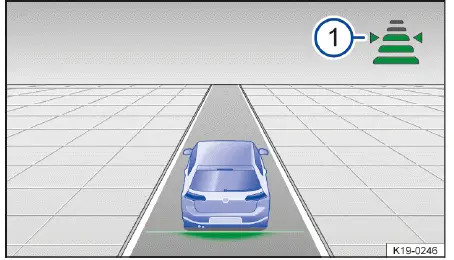
Fig. 1 In the instrument cluster display: set distance 1,
ACC is regulating (general example).
In the Volkswagen ID.4, you can precisely adjust the following distance to suit your driving style and road conditions. The system provides five clearly defined levels, ranging from very short to very long, allowing both comfort and safety to be optimized depending on traffic conditions.
1. Press the
 button.
2. Adjust the distance by pressing the + or - buttons, or swipe vertically across the control surface from
 to increase or decrease the gap.
Or: Press the
 button repeatedly until your preferred following distance is selected.
The selected level is displayed directly in the instrument cluster of the Volkswagen ID.4 → fig. 1 -1-. Always comply with country-specific regulations regarding minimum following distances.
Within the Infotainment system, you can also define whether the Volkswagen ID.4 should resume with the last used distance setting or a predefined default distance at the start of each journey.
Setting the speed
The Volkswagen ID.4 allows fine and precise control of the stored cruising speed using the multi-function steering wheel controls:
+ 1 km/h (1 mph): Press the + button gently for small incremental increases.
- 1 km/h (1 mph): Press the - button gently to slightly reduce the speed.
+ 10 km/h (5 mph): Press the + button firmly or swipe upward. The system will jump to the next higher interval, simplifying quick adjustments.
- 10 km/h (5 mph): Press the - button firmly or swipe downward to reduce speed in larger steps.
To continuously change the stored speed in the Volkswagen ID.4, simply press and hold the respective button.
WARNING
ACC
The Adaptive Cruise Control system in the Volkswagen ID.4 may not always correctly assess every driving situation. If the distance to the vehicle ahead becomes too short and the speed difference is significant, the system may not brake sufficiently, creating a risk of rear-end collisions that can lead to serious injuries or fatalities.
Adjusting the regulation function system settings
The Volkswagen ID.4 allows you to tailor how ACC responds, especially in more dynamic or sporty driving situations:
 Certain ACC preferences can be stored within driver personalization profiles in the Volkswagen ID.4 and automatically applied when switching users.
Troubleshooting
 ACC is not available
The yellow indicator light is displayed.
Volkswagen strongly recommends professional diagnosis at an authorized Volkswagen Service Facility.
ACC is not functioning as expected
Ensure the surrounding area is unobstructed and free of damage.
Volkswagen recommends visiting an authorized Volkswagen Service Facility for assistance.
 Additional diagnostic details may be displayed in the vehicle status menu depending on the issue.
The Adaptive Cruise Control cannot start
Ensure the following conditions are met in the Volkswagen ID.4:
Unusual noises during automatic braking
This behavior is normal in the Volkswagen ID.4 and does not indicate a malfunction.
Controls are responding differently than expected
Moisture, dirt, or grease can affect the responsiveness of touch-sensitive controls.
1. Always keep control surfaces clean and dry to ensure proper functionality.
Introduction
Predictive cruise control in the Volkswagen ID.4 enhances driving by automatically adapting speed to upcoming road conditions such as curves, intersections, and roundabouts, based on navigation and traffic sign data.
Predictive cruise control is an advanced extension of ACC
and integrates information from the Dynamic Road Sign Display and the Infotainment navigation system.
This feature depends on equipment level and may not be available in all regions for the Volkswagen ID.4.
Response to the end of a traffic jam
Vehicles equipped with V2X communication technology in the Volkswagen ID.4 can interact with nearby vehicles, enabling early detection of traffic jams and proactive speed reduction.
Requirements:
WARNING
Predictive cruise control in the Volkswagen ID.4 does not replace driver attention and operates within system limits only.
The system may fail to detect certain speed limits or react with delays or inaccuracies. Improper use can result in accidents, serious injuries, or death.
 Always consider system limitations and additional information related to ACC.

Selected owner and service information from our Volkswagen ID.4 manual library.
 ID.4 Guide
Practical Volkswagen ID.4 service procedures for joining and separating components, connectors and assemblies correctly and without unnecessary damage.
Read guide ID.4 Guide
See how Apple CarPlay works in the Volkswagen ID.4, including smartphone integration, navigation, calls, music and key infotainment functions.
Read guide