



Switching the Ignition On and Off
How to switch the Volkswagen ID.4 ignition on and off correctly, including the basic operating conditions and what the driver should expect from the vehicle.
Read guide




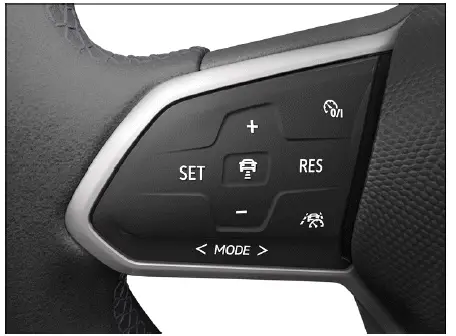
Fig. 1 Left side of the multi-function steering wheel.
Switching on
1. Press the
 button.
The ACC system in the Volkswagen ID.4 is now activated but not yet regulating speed.
Starting the regulation function
1. While driving forward, press the
 button.
The Volkswagen ID.4 saves the current speed and maintains the selected distance from the vehicle ahead. If the speed is outside the allowed range, the system automatically adjusts it accordingly.
Depending on the selected driving mode, systems such as ASR Sport and ESC Sport may be deactivated.
The following indicators may appear:
 ACC is regulating - no vehicle ahead detected.
 ACC is regulating - vehicle ahead detected.
If ACC is inactive, gray indicator lights will be shown.
Canceling the regulation function
1. Press the
 button briefly.
Or: Press the brake pedal to deactivate regulation.
The previously set speed and distance remain stored in the Volkswagen ID.4.
If ASR Sport is activated, ACC regulation will be interrupted automatically.
Resuming the regulation function
1. Press the
 button.
The Volkswagen ID.4 resumes the previously set speed and distance, and corresponding indicators appear in the instrument cluster.
Switching off
1. Press and hold the
 button.
The stored speed value is deleted.
Switching to other driver assistance systems
Depending on equipment, the Volkswagen ID.4 allows switching between different driver assistance systems:
1. Press or swipe the
 button.
2. Swipe left or right to select the desired system.
3. Press the
 button.

Selected owner and service information from our Volkswagen ID.4 manual library.
 ID.4 Guide
How to switch the Volkswagen ID.4 ignition on and off correctly, including the basic operating conditions and what the driver should expect from the vehicle.
Read guide ID.4 Guide
Professional Volkswagen ID.4 repair guidance for welding plastic attachments, securing damaged mounting points and restoring plastic components correctly.
Read guide