



Welding Plastic Attachments
Professional Volkswagen ID.4 repair guidance for welding plastic attachments, securing damaged mounting points and restoring plastic components correctly.
Read guide




The Volkswagen ID.4 may be equipped with multiple USB-C ports designed for both charging and data transfer:
 Symbol for a USB
port for data transmission and charging.
Symbol for a USB
port for data transmission and charging.
 Symbol for a USB
port for charging only.
Symbol for a USB
port for charging only.
Available Charging Power
The USB-C ports in the Volkswagen ID.4 can provide voltages of up to 20 V, enabling charging power of up to 45 W depending on the connected device and cable quality.
Depending on the configuration of the Volkswagen ID.4, the following charging standards may be supported:
The actual charging performance in the Volkswagen ID.4 may vary depending on several factors:
 For dual
USB
ports, the available charging power in the Volkswagen ID.4 may be distributed between both connections.
For dual
USB
ports, the available charging power in the Volkswagen ID.4 may be distributed between both connections.
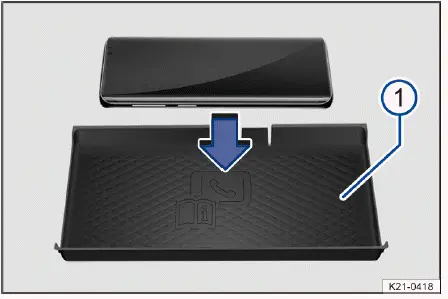
Fig. 1 General example: storage compartment with a liner
pad for wireless charging in the center console.
The wireless charging feature in the Volkswagen ID.4 depends on the vehicle equipment and may not be available in all markets.
This function uses electromagnetic induction to transfer energy wirelessly over short distances. To use wireless charging in the Volkswagen ID.4, a Qi-certified smartphone is required. Compatibility details can be found in the mobile device documentation or provided by the manufacturer.
The maximum wireless charging output in the Volkswagen ID.4 is 5 watts.
Depending on the configuration, the wireless charging shelf in the Volkswagen ID.4 is located either in the center console or between the front seats within a storage compartment.
Some versions of the Volkswagen ID.4 feature a phone symbol on the liner mat, indicating the optimal placement position for wireless charging. The design of this symbol may vary.
Only one Qi-certified smartphone without a protective case and with maximum dimensions of approximately 80 mm x 140 mm (3 in x 6 in) should be placed flat on the charging pad.
Devices exceeding these dimensions may not be charged wirelessly in the Volkswagen ID.4.
Wireless Cell Phone Charging
Requirements
✓ Use a compatible Qi-certified smartphone within the supported size limits.
1. Before charging, remove all metallic objects such as coins from the compartment and follow the device manufacturer’s instructions.
2. Place the smartphone flat in the center of the charging pad with the display facing upward.
The wireless charging process in the Volkswagen ID.4 will begin automatically.
The Infotainment system will notify you when charging starts and may also display warnings if foreign metallic objects are detected. Remove such objects immediately.
Your Cell Phone Is Not Recognized
If the smartphone is not positioned correctly or exceeds the supported size, the Volkswagen ID.4 may not detect it properly. In some cases, the system may indicate the presence of a foreign object.
To resolve this issue, remove the device and reposition it correctly in the center of the charging surface. Ensure proper alignment for optimal wireless charging performance in the Volkswagen ID.4.
For best results, always use certified cables and compatible devices to ensure safe and efficient charging in the Volkswagen ID.4.
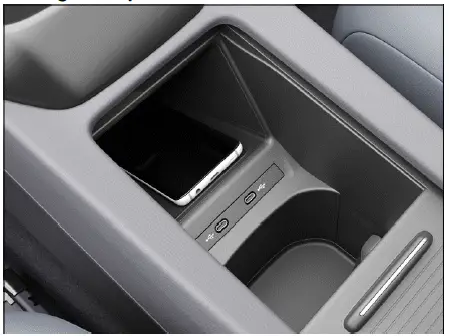
Fig. 2 General example: Storage compartment cover
(open).
In the Volkswagen ID.4, the storage compartment used for the wireless charging function may be equipped with a dedicated cover designed to conceal the cell phone display and improve driver focus.
Only a compatible smartphone with maximum dimensions of approximately 80 mm x 140 mm (3 in x 6 in), in accordance with Volkswagen ID.4 specifications, should be placed inside this covered compartment.
The integrated cover in the Volkswagen ID.4 helps minimize distractions by blocking visual notifications such as incoming calls or messages while driving.
For safety reasons, the cover must always remain closed during vehicle operation, ensuring that the smartphone display is completely hidden from the driver’s view.
WARNING
Notifications or illuminated displays from mobile devices can distract the driver of the Volkswagen ID.4 and lead to accidents resulting in serious or fatal injuries.
WARNING
Metal objects placed on the wireless charging surface in the Volkswagen ID.4 may heat up significantly and cause burns or even fire hazards.
NOTICE
Placing cards with magnetic strips or chips (such as ID cards, bank cards, or credit cards) on the wireless charging shelf in the Volkswagen ID.4 may damage stored data and render them unusable.

Selected owner and service information from our Volkswagen ID.4 manual library.
 ID.4 Guide
Professional Volkswagen ID.4 repair guidance for welding plastic attachments, securing damaged mounting points and restoring plastic components correctly.
Read guide ID.4 Guide
See how Apple CarPlay works in the Volkswagen ID.4, including smartphone integration, navigation, calls, music and key infotainment functions.
Read guide