



Charging Process Indicator
Learn how the Volkswagen ID.4 charging process indicator shows charging status, progress and key visual signals during AC and DC charging.
Read guide




In the Volkswagen ID.4, the automatic braking support of the parking system is designed to help prevent collisions by detecting obstacles and intervening when necessary during low-speed maneuvers.
Parking systems with braking support
Depending on the equipment level, the Volkswagen ID.4 is equipped with advanced parking systems that include maneuver braking and emergency braking assistance →
 .
.
These intelligent systems enhance safety by assisting the driver during parking and tight maneuvers, but they must always be used with full driver awareness.
WARNING
The automatic braking support in the Volkswagen ID.4 does not replace driver responsibility and operates only within system limitations. In certain conditions, the system may not respond, may react late, or may intervene unexpectedly. This can lead to accidents, serious injuries, or even fatalities if the driver is not attentive.
Requirements
✓ When maneuvering, the Volkswagen ID.4 must not exceed approximately 10 km/h (6 mph).
✓ A parking assistance system must be active.
What happens during an automatic braking intervention?
If the Volkswagen ID.4 detects an obstacle, it will automatically brake to a complete stop and hold the vehicle stationary for approximately two seconds.
1. After the automatic braking, press the brake pedal to keep the Volkswagen ID.4 stationary.
2. Carefully check the surroundings before continuing.
For vehicles equipped with Park Assist Plus, if the speed is too high, the Volkswagen ID.4 will brake automatically, and the parking maneuver can then be resumed safely.
Depending on the system configuration, a message may appear in the instrument cluster display.
Switching on and off
Automatic braking support in the Volkswagen ID.4 is activated or deactivated together with the selected parking system.
Maneuver braking for Park Distance Control
The maneuver braking function in the Volkswagen ID.4 is automatically activated each time the ignition is switched on.
1. Briefly press the accelerator pedal to override or cancel the automatic braking intervention →
 .
.
Deactivate function:
1. Tap the
 function key on the Park Distance Control screen.
2. Confirm the selected setting.
 If an obstacle is detected at the front of the Volkswagen ID.4, automatic braking support may not activate if Park Distance Control was engaged automatically while driving forward.
Driving with a trailer
If a trailer is electrically connected to the Volkswagen ID.4, automatic braking support for the rear area is automatically deactivated.
For non-factory-installed trailer hitches, the parking system in the Volkswagen ID.4 must be manually switched off when towing.
General information
 If automatic braking occurs too frequently or unnecessarily, temporarily switch off the parking system and maneuver the Volkswagen ID.4 carefully, for example when parking in tight garages or driving off-road.
 After a maneuver braking intervention, the function remains inactive for approximately 5 meters (16 ft) when continuing in the same direction. It reactivates after changing gear or direction.
 If emergency braking occurs during a Park Assist Plus maneuver, the parking process will be canceled automatically.
 Following a Rear Traffic Alert emergency braking event, automatic braking support in the Volkswagen ID.4 will be temporarily unavailable for approximately 10 seconds before reactivating.
For optimal safety, drivers of the Volkswagen ID.4 should always combine system assistance with attentive observation of the environment, especially in complex parking situations.
Troubleshooting
The parking system is functioning differently than expected
Fault displays
1. Pay close attention to any warning messages shown in the instrument cluster display or Infotainment system of the Volkswagen ID.4.
NOTICE
Using the parking system in the Volkswagen ID.4 despite a malfunction may result in vehicle damage.
No sensor range or the parking system has been switched off
If a sensor fault occurs in the Volkswagen ID.4, the affected detection area is automatically deactivated.
The corresponding sensor zone may be displayed in the Infotainment system using a symbol, and in some cases the entire parking system in the Volkswagen ID.4 may be switched off for safety reasons.
If Park Distance Control malfunctions, a continuous warning tone will sound for several seconds when the system is activated.
A message may also appear in the instrument cluster display.
1. Check whether any of the listed causes apply.
2. Resolve the issue and reactivate the parking system in the Volkswagen ID.4.
3. If the problem persists, consult an authorized Volkswagen dealer or authorized Volkswagen Service Facility.
Volkswagen recommends professional inspection to ensure proper functioning of the Volkswagen ID.4 systems.
After a wheel change, Park Assist (Park Assist Plus) parks inaccurately
After replacing wheels or tires on the Volkswagen ID.4, Park Assist Plus may temporarily calculate incorrect distances, for example positioning the vehicle too far from or too close to the curb.
1. Drive the Volkswagen ID.4 over a longer distance, including curves and turns.
The system will automatically recalibrate and relearn the new wheel dimensions after a complete ignition cycle.
Park Assist (Park Assist Plus) with memory function does not detect the saved parking space
The Volkswagen ID.4 may not correctly recognize the surroundings of a previously saved parking space under certain conditions.
1. Position the vehicle as close as possible to the stored parking route.
Or: avoid using the parking system in poor weather or low-light conditions.
Or: clean the front camera to improve detection accuracy.
Or: ensure that an active Internet connection is available, as the Volkswagen ID.4 uses geolocation data to determine its position.
Camera for Park Assist (Park Assist Plus) with Memory Function Deactivated
The assistance camera in the Volkswagen ID.4 may automatically deactivate if exposed to high temperatures or prolonged direct sunlight.
Once normal operating conditions are restored, Park Assist Plus with memory function will become available again.
1. If necessary, switch the drive system off and then back on.
Introduction
Park Distance Control in the Volkswagen ID.4 supports the driver during parking maneuvers and provides visual and acoustic warnings when obstacles are detected.
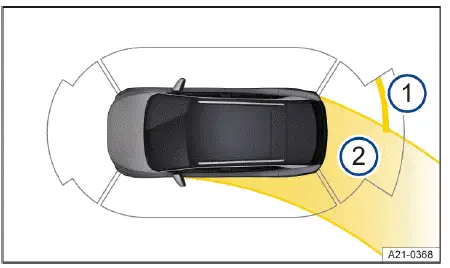
Fig. 1 Infotainment system: Display of Park Distance
Control (general example).
For best results, drivers should regularly clean sensors and cameras and remain attentive, as even advanced systems in the Volkswagen ID.4 cannot fully replace human awareness during parking.
System function
In the Volkswagen ID.4, Park Distance Control (PDC) uses advanced ultrasonic sensors to continuously measure the distance between the vehicle and nearby obstacles, helping the driver maneuver safely in tight spaces.
The system provides visual feedback through colored segments on the Infotainment display and acoustic warning signals to alert the driver of potential collisions → fig. 1. This makes parking the Volkswagen ID.4 more intuitive and controlled.
If the driver of the Volkswagen ID.4 does not react in time to an approaching obstacle, automatic braking support may be activated to reduce the risk of a collision →
 .
.
WARNING
Park Distance Control in the Volkswagen ID.4 is a driver assistance feature and does not replace driver awareness. The system operates within its technical limits and may fail to detect certain obstacles or react in time. Incorrect use may result in accidents or serious injuries.
The system may not recognize all objects, may respond too late, or may react unexpectedly in certain conditions. Always remain attentive when operating the Volkswagen ID.4.
NOTICE
The Park Distance Control system in the Volkswagen ID.4 only issues warnings for obstacles within the calculated vehicle path. The risk of collision becomes critical when the penultimate segment is displayed or when a continuous tone is emitted.
NOTICE
Depending on the configuration of the Volkswagen ID.4, side-area obstacle detection may be limited. Objects entering from outside the detection range may not be displayed, increasing the risk of damage.
Screen display
 Red section: obstacle very close. Immediate braking is required to avoid collision.
 Yellow section: obstacle detected in the driving path. Steering adjustment is recommended.
 Grey section: obstacle outside the driving path or possible sensor limitation.
 Maneuver braking is deactivated or not functioning correctly.
 Option to mute warning signals.
 A system malfunction is detected in the monitored area. Display colors may vary depending on equipment.
Park Distance Control settings
1. Tap the
 control for parking functions located in the upper section of the center console.
2. Select the
 function key in the Infotainment system.
3. Choose the desired configuration, such as automatic activation when driving forward or enabling/disabling maneuver braking.
Driving with a trailer
If a trailer is connected electrically to the Volkswagen ID.4, the rear and side sensors of Park Distance Control are automatically deactivated.
 Certain PDC settings, such as warning chime volume, can be stored in driver profiles in the Volkswagen ID.4 and will automatically adjust when switching between profiles.
For best results, regularly clean the sensors and remain attentive, as even advanced systems in the Volkswagen ID.4 cannot fully replace careful driving during parking maneuvers.

Selected owner and service information from our Volkswagen ID.4 manual library.
 ID.4 Guide
Learn how the Volkswagen ID.4 charging process indicator shows charging status, progress and key visual signals during AC and DC charging.
Read guide ID.4 Guide
Professional Volkswagen ID.4 repair guidance for welding plastic attachments, securing damaged mounting points and restoring plastic components correctly.
Read guide