



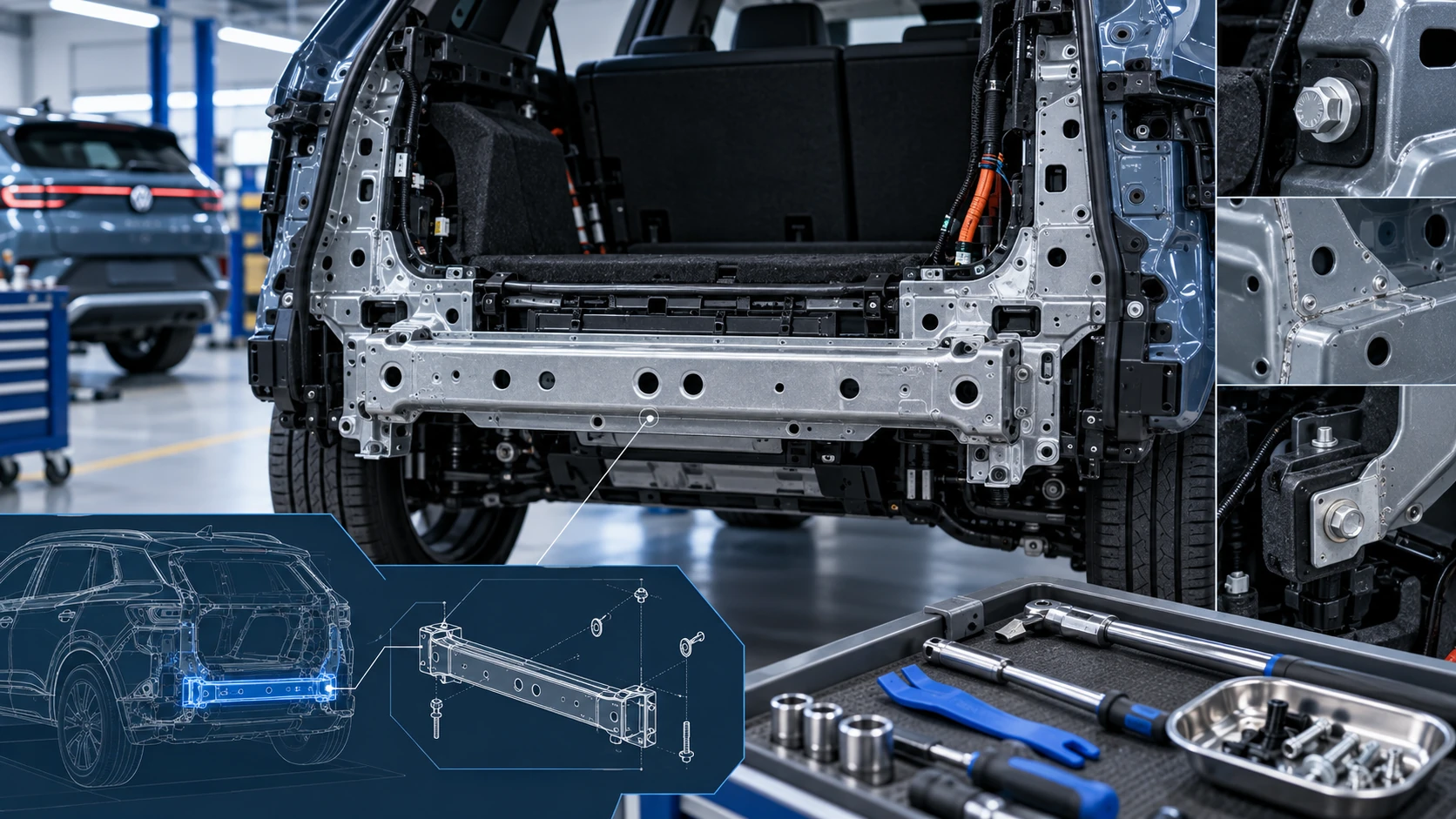
Rear Cross Member
Service information for the Volkswagen ID.4 rear cross member, including component location, attachment points and repair-oriented removal and installation guidance.
Read guide




The Auto Hold function in the Volkswagen ID.4 prevents the vehicle from rolling when stationary, eliminating the need to continuously press the brake pedal and improving driving comfort in everyday traffic situations.
Depending on equipment, the Volkswagen ID.4 may be equipped with the Auto Hold feature, which enhances safety and convenience, especially in urban driving and stop-and-go traffic.
Requirements
✓ The driver door must be closed.
✓ The Volkswagen ID.4 must be in drive-ready mode.
When the transmission is in neutral, Auto Hold cannot be activated or deactivated. In this case, the Volkswagen ID.4 will not be secured against rolling →
 .
.
Switching on
1. Open the vehicle settings in the Infotainment system (→ Vehicle settings menu).
2. Navigate to the Vehicle menu.
3. Open the Exterior submenu.
4. Select the Brakes section.
5. Activate Auto Hold.
Auto Hold in the Volkswagen ID.4 is now ready for operation, although it may not yet actively hold the vehicle stationary →
 .
.
 The grey indicator light appears in the instrument cluster when Auto Hold is enabled.
Auto Hold remains active in the Volkswagen ID.4 even after restarting the drive system.
Keeping the vehicle stationary using Auto Hold
1. With Auto Hold activated in the Volkswagen ID.4, bring the vehicle to a complete stop using the brake pedal.
2. Release the brake pedal →
 .
.
The Volkswagen ID.4 will remain stationary without additional driver input.
 The green indicator light confirms that Auto Hold is actively holding the vehicle.
The holding function automatically releases when the Volkswagen ID.4 begins to move or when system requirements are no longer met.
Switching off
Auto Hold can only be deactivated when the brake pedal is pressed →
 .
.
1. Turn off Auto Hold in the Infotainment system settings.
WARNING
Auto Hold in the Volkswagen ID.4 is a support feature and does not replace driver responsibility. The system may not hold the vehicle securely in all situations, such as steep slopes or slippery conditions. Failure to remain attentive can result in accidents or serious injuries.
NOTICE
When using automated car washes, the Auto Hold function in the Volkswagen ID.4 may cause the wheels to lock, potentially resulting in vehicle damage.
Safety instructions
WARNING
Parking assistance systems in the Volkswagen ID.4 are designed to support the driver but cannot replace attention and awareness. They operate within physical and technical limitations and may not detect all obstacles or situations.
NOTICE
When maneuvering in tight parking spaces, obstacles may not be detected accurately, which could result in damage to the Volkswagen ID.4.
Sensor and camera boundaries
The Volkswagen ID.4 uses a combination of ultrasonic sensors, radar systems, and cameras to monitor its surroundings. These systems have inherent limitations that must be considered → :
 .
.
 Volkswagen recommends practicing parking with the Volkswagen ID.4 in a safe, traffic-free environment to better understand system behavior.
Requirements
 Parking assistance functions in the Volkswagen ID.4 may be restricted in certain regions due to local regulations.
General information
To ensure optimal performance of parking systems in the Volkswagen ID.4, the following conditions must be met:
✓ All doors and the trunk lid are closed.
✓ Exterior mirrors are unfolded.
✓ Sensors and cameras are unobstructed by accessories or license plate holders.
✓ The Volkswagen ID.4 is positioned on level ground.
✓ The load distribution is even.
✓ The vehicle is in drive-ready mode.
✓ Driver assistance systems such as ESC and ASR are active.
 Using other Infotainment functions while parking may temporarily disable parking assistance warnings.
Finding a suitable parking space
✓ The parking space must be larger than the Volkswagen ID.4 dimensions and allow sufficient maneuvering space.
✓ Maintain a distance of approximately 1 m (3 ft) when passing a parking space.
✓ For vehicles with Park Assist Plus, maximum speed when passing a parallel parking space is approx. 40 km/h (25 mph), and approx. 20 km/h (12 mph) for perpendicular spaces.
✓ For systems with memory function, calibration speed should not exceed approx. 40 km/h (25 mph).

Selected owner and service information from our Volkswagen ID.4 manual library.
 ID.4 Guide
Service information for the Volkswagen ID.4 rear cross member, including component location, attachment points and repair-oriented removal and installation guidance.
Read guide ID.4 Guide
How to switch the Volkswagen ID.4 ignition on and off correctly, including the basic operating conditions and what the driver should expect from the vehicle.
Read guide