



Rear Cross Member
Service information for the Volkswagen ID.4 rear cross member, including component location, attachment points and repair-oriented removal and installation guidance.
Read guide




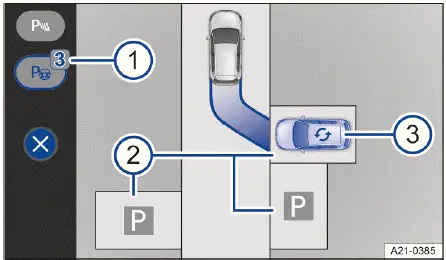
Fig. 1 Infotainment system: selecting a parking space
(general example).
Searching for parking spaces
1. Tap the
 control for the
parking menu in the Volkswagen ID.4.
control for the
parking menu in the Volkswagen ID.4.
2. While continuously monitoring traffic conditions, drive slowly past a row of parked vehicles.
The Volkswagen ID.4 with Park Assist Plus will automatically scan for suitable parking spaces during this process.
Detected parking spaces are automatically displayed, and one is highlighted as the preferred option (blue vehicle) in the Infotainment system → fig. 1 -2- and -3-.
The total number of detected parking spaces is shown via the
 function key → fig. 1 -1-.
3. Bring the Volkswagen ID.4 to a complete stop using the brake pedal.
Changing parking spaces
If multiple parking spaces are detected, the driver of the Volkswagen ID.4 can manually select a preferred option.
1. Tap the desired parking space directly on the Infotainment display → fig. 1 -2-.
The system updates the preferred parking space (blue vehicle) accordingly.
Changing parking scenarios
If different parking scenarios are available, a corresponding symbol will appear above the parking space → fig. 1 -3-.
1. Tap the
 symbol.
The Volkswagen ID.4 will display an alternative parking scenario.
 Park Assist Plus in the Volkswagen ID.4 can also be activated afterward. When driving past a suitable parking space, the system will notify the driver.

Selected owner and service information from our Volkswagen ID.4 manual library.
 ID.4 Guide
Service information for the Volkswagen ID.4 rear cross member, including component location, attachment points and repair-oriented removal and installation guidance.
Read guide ID.4 Guide
How to switch the Volkswagen ID.4 ignition on and off correctly, including the basic operating conditions and what the driver should expect from the vehicle.
Read guide