Volkswagen ID.4: Spoiler
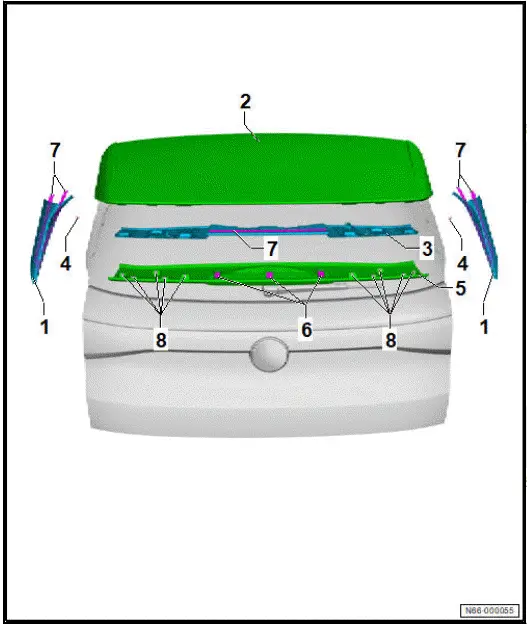
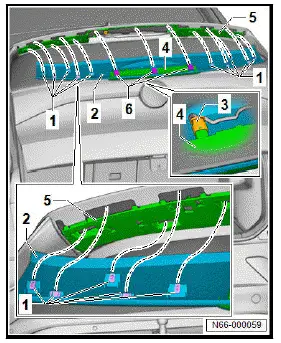
Assembly overview - spoiler
- Side spoiler
- Renew after removing
- ⇒ Rep. gr. 66 ; Removing
and installing
side spoiler
- Rear lid
- ⇒ Rep. gr. 55 ; Removing
and installing
rear lid
- Carrier for spoiler trim
- Renew after removing
- ⇒ Rep. gr. 66 ; Removing
and installing
spoiler trim carrier
- Bolt
- Spoiler trim
- With high-level brake
light bulb - M25-
- ⇒ Rep. gr. 66 ; Removing
and installing
spoiler trim
- Velcro tape
- Adhesive tape
- Clip
Removing and installing side spoiler
Special tools and workshop equipment required
- hot air blower - V.A.G 1416-
Removal and installation are described for left side of vehicle as
an example.
Important
- Observe specifications with regard to temperature, minimum
curing period, removal of adhesive residue and cleaning
⇒ General information - body; Rep. gr. 52 ; Self-adhesive
components; Specifications for self-adhesive components .
Removing
- Remove spoiler trim ⇒ "2.3 Removing and installing spoiler
trim"
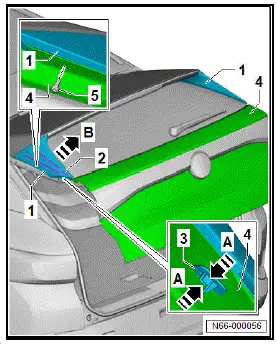
- Unscrew bolt -5-.
- Apply heat from hot air blower - V.A.G 1416- to side spoiler
-1- in area of adhesive strips -2-.
- Press together locking devices -3- in direction of -arrow A-.
- Pull side spoiler -1- in direction of -arrow B- off rear lid -4-.
Installing
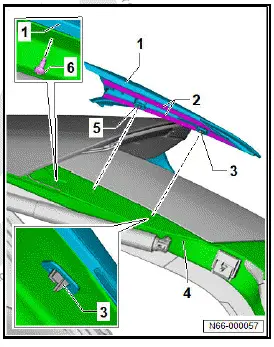
- Remove adhesive residue, and clean bonding surfaces.
- Position side spoiler -1- with centring pin -5- and locking
devices -3- on rear lid -4-, and align it.
- Pull protective backing off adhesive tape -2-.
- Press side spoiler -1- onto rear lid -4-.
Make sure that the locking devices -3- engage correctly in rear
lid -4-.
- Tighten bolt -6-.
- Press on side spoiler -1- with a force of between 70 N and
105 N in area of adhesive strips -2-.
Important
- The minimum drying time must be adhered to.
Tightening torques
- ⇒ Rep. gr. 66 ; Assembly overview - spoilers
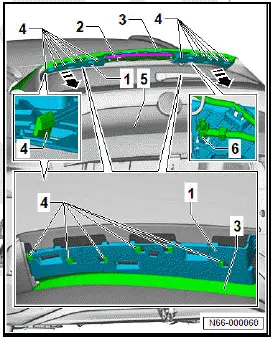
Removing and installing spoiler trim
The spoiler trim will henceforth be referred to as "trim".
Removing
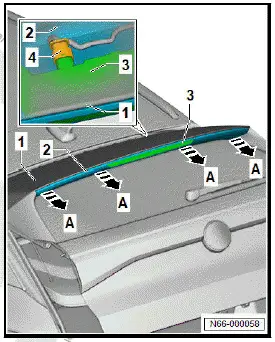
- Pull trim -2- in direction of -arrow A- off spoiler -1-.
- Disconnect electrical connector -4- for high-level brake light
bulb - M25- -3-.
Installing
Important
- If adhesive strips -6- are loose or damaged, trim -2- must be
renewed.
- Damaged fasteners must be renewed.
- Connect electrical connector -3- for high-level brake light
bulb - M25- -4-.
- Position trim -2- on spoiler trim carrier -5-, and align it.
- Push clips -1- into openings in spoiler trim carrier -5-.
- Push on Velcro tape -6- in area of high-level brake light bulb
- M25- -4-.
- Press trim -2- onto spoiler trim carrier -5-.
Removing and installing spoiler trim carrier
Special tools and workshop equipment required
- hot air blower - V.A.G 1416-
The spoiler trim carrier is referred to hereafter as carrier.
Important
Removing
- Remove spoiler trim ⇒ "2.3 Removing and installing spoiler
trim" .
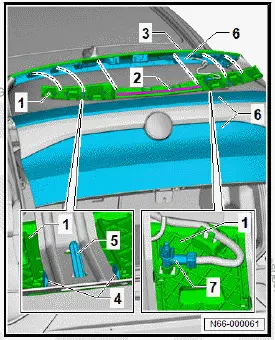
- Apply heat from hot air blower - V.A.G 1416- to carrier -1- in
area of adhesive tape -2-.
- Pull off carrier -1- from spoiler -3-.
- Using commercially available plastic wedge, unclip locking
devices -4- from rear lid -5-.
- Pull hose for washer fluid -6- off carrier -1-.
- Remove carrier -1-.
Installing
Install in reverse order of removal, observing the following:
- Remove adhesive residue, and clean bonding surfaces
⇒ General information - body; Rep. gr. 52 ; Self-adhesive
components; Specifications for self-adhesive components .
- Fit hose for washer fluid -7- onto carrier -1-.
- Pull protective backing off adhesive tape -2-.
- Insert centring pins -5- into rear lid -6-.
- Push on carrier -1-.
Make sure that the locking devices -4- engage correctly in rear
lid -6-.
- Firmly press carrier -1- in area of adhesive tape against
spoiler -3-.
- Press on carrier -1- with a force of between 70 N and 80 N in
area of adhesive tape.
Important
- The minimum drying time must be adhered to.
Volkswagen ID.4 (E21) 2021-2026 Service Manual
Spoiler
Explore moreFeatured ID.4 Guides
Selected owner and service information from our Volkswagen ID.4 manual library.
 ID.4 Guide
How to switch the Volkswagen ID.4 ignition on and off correctly, including the basic operating conditions and what the driver should expect from the vehicle.
Read guide → ID.4 Guide
Learn how the Volkswagen ID.4 charging process indicator shows charging status, progress and key visual signals during AC and DC charging.
Read guide →