



Switching the Ignition On and Off
How to switch the Volkswagen ID.4 ignition on and off correctly, including the basic operating conditions and what the driver should expect from the vehicle.
Read guide




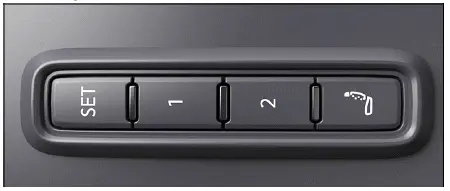
Fig. 1 On the outer side of the driver's seat: memory
buttons.
The Volkswagen ID.4 allows you to store and recall personalized driver seat and exterior mirror positions using integrated memory buttons, enhancing driving comfort and convenience.
Storing the driver's seat and outside mirror settings for driving forward
1. Activate the electronic parking brake in your Volkswagen ID.4.
2. Shift the transmission to neutral.
3. Switch the ignition on.
4. Adjust the driver’s seat and mirrors to your preferred positions.
5. Press and hold the
 → fig. 1
button for more than one second.
→ fig. 1
button for more than one second.
6. Press one of the memory buttons within approximately ten seconds.
An audible signal confirms that the settings have been stored in the Volkswagen ID.4.
Storing the front passenger's outside mirror settings for driving in reverse
1. Activate the electronic parking brake.
2. Shift the transmission to neutral.
3. Switch the ignition on.
4. Press the desired memory button → fig. 1.
5. Engage reverse gear.
6. Adjust the passenger-side mirror so that features such as the curb edge are clearly visible.
This mirror position will be automatically saved and linked to the vehicle key used in the Volkswagen ID.4.
Recalling driver's seat and outside mirror settings
1. When the Volkswagen ID.4 is stationary, ignition off, and a door open, briefly press the corresponding memory button.
After approximately ten minutes, automatic adjustment is no longer available. Pressing a memory button again will cancel the process.
Alternatively: with ignition on or doors closed, press and hold the selected memory button until the stored position is reached.
The passenger-side mirror automatically returns from its reverse position when the Volkswagen ID.4 moves forward at speeds above approximately 15 km/h (10 mph) or when mirror settings are changed manually.
 If the driver’s door is opened more than approximately ten minutes after unlocking the Volkswagen ID.4, automatic adjustment of seat and mirrors will not occur.
For optimal comfort and personalization, regularly use the memory function in your Volkswagen ID.4 to adapt seating and mirror positions to your driving preferences.
In the Volkswagen ID.4, the front seat convenience entry function is designed to improve comfort and accessibility when entering or exiting the vehicle.
Variant 1: When the driver door is opened, the driver seat in the Volkswagen ID.4 automatically moves to a position that allows easier entry. After closing the driver door and switching on the ignition, the seat returns smoothly to its previously stored position.
Version 2: Before exiting the Volkswagen ID.4, the driver seat automatically moves backward and remains in this position to provide additional space for exiting the vehicle comfortably.
Once the vehicle is re-entered and the driver door is closed, the driver seat in the Volkswagen ID.4 moves forward again to the last saved position.
The front seat convenience entry function can be activated or deactivated via the Infotainment system settings in the Volkswagen ID.4.
Driver personalization
The Volkswagen ID.4 allows you to store personalized seat and mirror settings using the driver personalization feature, ensuring a tailored driving experience.
After switching off the ignition and locking the Volkswagen ID.4, the current seat position and outside mirror adjustments are saved to the active user profile.
When the vehicle is unlocked and the driver door is opened, the saved settings are automatically restored, providing seamless comfort in the Volkswagen ID.4.
When switching or selecting a user profile, the seat in the Volkswagen ID.4 behaves as follows:
 Some settings in the Volkswagen ID.4 can be saved within user profiles and will automatically change when switching between drivers.
WARNING
Improper use of seat adjustment functions in the Volkswagen ID.4 can result in injuries.

Selected owner and service information from our Volkswagen ID.4 manual library.
 ID.4 Guide
How to switch the Volkswagen ID.4 ignition on and off correctly, including the basic operating conditions and what the driver should expect from the vehicle.
Read guide ID.4 Guide
Learn the basics of Volkswagen ID.4 bidirectional charging, including energy flow concepts, home power use and vehicle-to-home charging capability.
Read guide