



Plastic Repair
Volkswagen ID.4 plastic repair procedures covering surface preparation, filler work, sanding and restoration of damaged plastic exterior components.
Read guide




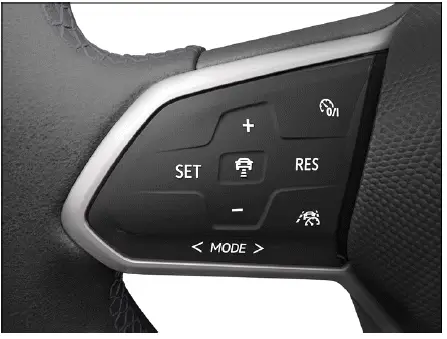
Fig. 1 Left side of the multi-function steering wheel.
Switching on
1. Press the
 button to activate the cruise control system in the Volkswagen ID.4.
No speed is stored at this stage. The system is ready but will not yet regulate the vehicle speed.
Starting the regulation function
1. While driving the Volkswagen ID.4, press the
 button.
The cruise control system stores the current speed and begins maintaining it automatically.
Setting the speed
You can adjust the stored speed of the Volkswagen ID.4 while cruise control is active:
+ 1 km/h (1 mph): Press the + button briefly.
- 1 km/h (1 mph): Press the - button briefly.
+ 10 km/h (5 mph): Press the + button firmly or swipe upward. The first press jumps to the next tens value (km/h) or five-step value (mph).
- 10 km/h (5 mph): Press the - button firmly or swipe downward. The first press reduces to the next tens or five-step value.
To adjust the speed continuously, press and hold the corresponding button.
The Volkswagen ID.4 will automatically accelerate or decelerate to match the selected speed.
Canceling the regulation function
1. Press the
 button briefly.
Or: Press the brake pedal.
The previously set speed remains stored in the system memory of the Volkswagen ID.4.
Resuming the regulation function
1. Press the
 button.
The Volkswagen ID.4 resumes driving at the stored speed.
WARNING
There is a risk of accidents if the Volkswagen ID.4 resumes at an unsuitable stored speed or if conditions have changed. This may result in serious injury or death.
Switching off
1. Press and hold the
 button.
The cruise control system in the Volkswagen ID.4 is switched off and the saved speed is deleted.
Switching to other driver assistance systems
Depending on equipment, the Volkswagen ID.4 allows switching between assistance systems such as the speed limiter.
1. Press or swipe the
 button.
2. Swipe left or right to choose the desired system.
3. Confirm by pressing the
 button.
Troubleshooting
 Cruise control system malfunction
If a malfunction occurs, the yellow indicator light will illuminate in the Volkswagen ID.4.
The regulation function is canceled automatically
Introduction
The speed limiter in the Volkswagen ID.4 helps prevent exceeding a predefined maximum speed, enhancing safety and compliance with speed limits.
Speed range
The speed limiter is available in the Volkswagen ID.4 at speeds above approximately 30 km/h (20 mph).
Driving with the speed limiter
You can override the speed limit temporarily by pressing the accelerator pedal beyond the resistance point. When exceeding the set speed, a warning signal may sound and a green indicator appears.
Once the speed drops below the stored limit, the Volkswagen ID.4 automatically resumes limiting the speed.
Displays
When activated, the instrument cluster displays the saved speed and system status.
 Speed limiter active and regulating speed.
If the limiter is inactive, the indicator appears dimmed or grey.
Driving downhill
The Volkswagen ID.4 may not always maintain the preset speed on steep descents. The driver must be ready to apply brakes if necessary.
1. Use regenerative braking to control speed during long downhill driving.
This reduces strain on the braking system and improves efficiency.
WARNING
Using the speed limiter in unsuitable conditions can increase the risk of accidents and serious injuries when driving the Volkswagen ID.4.
The Volkswagen ID.4 cruise control and speed limiter systems provide enhanced comfort and safety, but they require attentive and responsible use by the driver at all times.

Selected owner and service information from our Volkswagen ID.4 manual library.
 ID.4 Guide
Volkswagen ID.4 plastic repair procedures covering surface preparation, filler work, sanding and restoration of damaged plastic exterior components.
Read guide ID.4 Guide
How to switch the Volkswagen ID.4 ignition on and off correctly, including the basic operating conditions and what the driver should expect from the vehicle.
Read guide