



Joining and Separating Techniques
Practical Volkswagen ID.4 service procedures for joining and separating components, connectors and assemblies correctly and without unnecessary damage.
Read guide




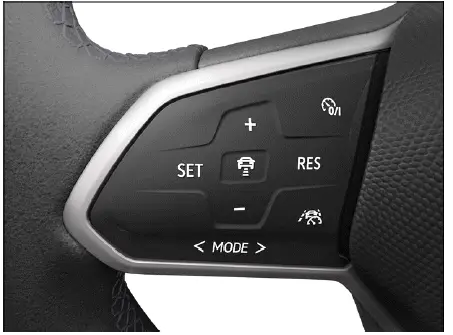
Fig. 1 Left side of the multi-function steering wheel.
Switching on
1. Press the
 button to enable the speed limiter system in the Volkswagen ID.4.
At this point, no maximum speed has been stored yet. The system is active but not regulating the vehicle speed.
Starting the regulation function
1. While driving the Volkswagen ID.4, press the
 button.
The current vehicle speed will be saved as the maximum permitted speed.
Setting the speed
You can adjust the stored maximum speed in the Volkswagen ID.4 as follows:
+ 1 km/h (1 mph): Press the + button briefly.
- 1 km/h (1 mph): Press the - button briefly.
+ 10 km/h (5 mph): Press the + button firmly or swipe upward. The system will jump to the next tens increment.
- 10 km/h (5 mph): Press the - button firmly or swipe downward. The system will decrease to the next tens value.
To change the speed continuously, press and hold the respective button.
Canceling the regulation function
1. Press the
 button.
The speed limiter function is paused, but the stored speed remains saved in the Volkswagen ID.4 system.
Resuming the regulation function
1. Press the
 button to reactivate the limiter.
Switching off
1. Press and hold the
 button.
This will completely deactivate the speed limiter in the Volkswagen ID.4 and erase the stored speed.
Switching to other driver assistance systems
Depending on the equipment of your Volkswagen ID.4, you can switch between different driver assistance systems:
1. Press or swipe the
 button.
2. Swipe left or right to select the desired system.
3. Confirm your selection by pressing the
 button.
Troubleshooting
 Speed limiter not available
A malfunction may occur in the Volkswagen ID.4, indicated by a yellow warning light.
1. Turn the vehicle drive system off and on again.
2. If the issue continues, deactivate the speed limiter and contact qualified specialists.
Volkswagen recommends visiting an authorized Volkswagen dealer or authorized Volkswagen Service Facility.
The regulation function is canceled automatically
Volkswagen recommends contacting an authorized Volkswagen dealer or service center.
For safety reasons, the speed limiter in the Volkswagen ID.4 will fully deactivate only after the accelerator pedal is released or the system is manually switched off.
Introduction
The predictive speed limiter in the Volkswagen ID.4 enhances driving safety by automatically adjusting your preset speed according to detected speed limits and navigation data.
The predictive speed limiter uses Dynamic Road Sign Display and navigation data from the Infotainment system to optimize speed regulation. However, availability may vary depending on region and equipment.
WARNING
The predictive speed limiter in the Volkswagen ID.4 is not a substitute for driver attention. It operates within technical limitations and may fail to detect all speed restrictions or respond accurately.
 Please also observe all safety instructions related to the speed limiter system.

Selected owner and service information from our Volkswagen ID.4 manual library.
 ID.4 Guide
Practical Volkswagen ID.4 service procedures for joining and separating components, connectors and assemblies correctly and without unnecessary damage.
Read guide ID.4 Guide
Professional Volkswagen ID.4 repair guidance for welding plastic attachments, securing damaged mounting points and restoring plastic components correctly.
Read guide