



Joining and Separating Techniques
Practical Volkswagen ID.4 service procedures for joining and separating components, connectors and assemblies correctly and without unnecessary damage.
Read guide




A properly installed screen separator in the Volkswagen ID.4 helps prevent luggage or objects from entering the passenger compartment during sudden braking or in the event of an accident, thereby increasing overall safety.
The screen separator can be installed behind the rear bench seat → fig. 1 or alternatively behind the front seats, depending on cargo configuration and storage needs.
Installing the net partition
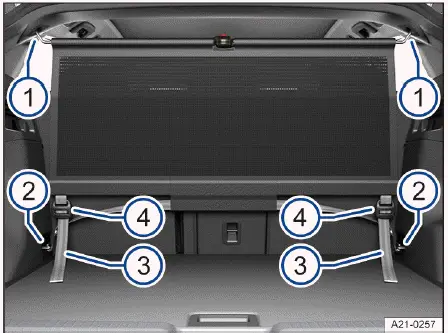
Fig. 1 In the Volkswagen ID.4 luggage compartment: Installing the screen separator behind the rear bench seat.
1. Remove the screen separator from its storage bag, unroll it, and unfold it fully. Ensure that the hinge locks into place with an audible click.
2. Adjust the front seats of the Volkswagen ID.4 to an upright and locked position.
3. Set the rear seat backrests upright and as close as possible to the separator.
4. Attach one hook of the upper crossbar to a roof holder → fig. 1 -1-.
5. Compress both ends of the crossbar slightly and secure the second hook into the opposite roof mount.
6. Release the crossbar and confirm that both hooks are securely engaged.
7. Attach the lower hooks to the front tie-down points → fig. 1 -2-.
Tensioning the screen separator
1. Pull the fastening straps backward until the screen separator is firmly tensioned → fig. 1 -3- →
 .
.
2. Recheck the tension whenever seat positions are adjusted to maintain proper function and safety.
Removing the net partition
1. Release the fastening straps → fig. 1 -3- by lifting the buckles → fig. 1 -4-.
2. Detach the lower hooks from the tie-down points → fig. 1 -2-.
3. Compress both ends of the crossbar and carefully remove it.
4. Slightly pull the separator back and remove it downward from the roof mounts → fig. 1 -1-.
5. Press the release button on the crossbar joint and fold the separator.
6. Roll it up and store it securely in its storage bag.
WARNING
In the Volkswagen ID.4, unsecured objects may be thrown forward during sudden braking or collisions, potentially causing severe or fatal injuries.
NOTICE
Improper attachment of the net partition may result in damage to the vehicle interior.
The Volkswagen ID.4 provides a versatile cargo management system with adjustable floor levels and protective separators, ensuring both safety and practicality for everyday use and long-distance travel.

Selected owner and service information from our Volkswagen ID.4 manual library.
 ID.4 Guide
Practical Volkswagen ID.4 service procedures for joining and separating components, connectors and assemblies correctly and without unnecessary damage.
Read guide ID.4 Guide
Volkswagen ID.4 plastic repair procedures covering surface preparation, filler work, sanding and restoration of damaged plastic exterior components.
Read guide